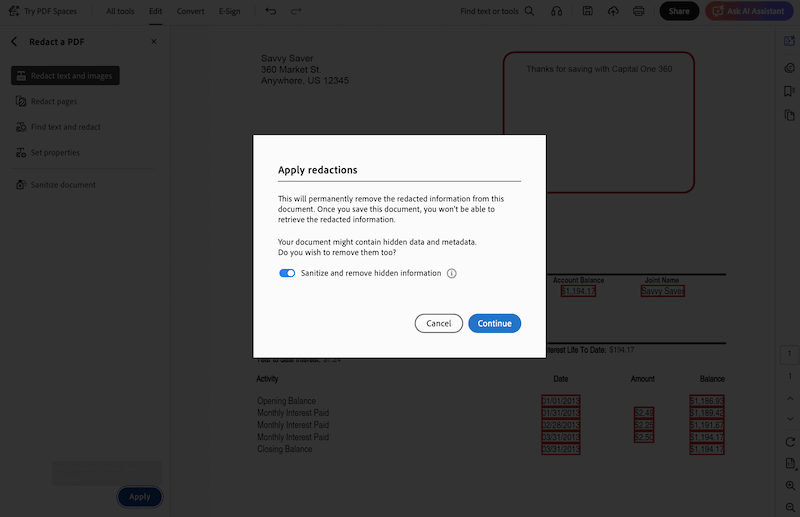
Recently, I was requested to submit a bank statement to provide proof of specific financial information for a rental application. For safety sake, I need to show up some certain information while keeping other sensitive details private. This took me some time and effort to make it. Therefore, in this short guide, I want to share some real experiences on a redacted bank statement, and help you save unnecessary troubles when you handle this kind of issue.
Table of Contents
- Part 1. What is a redacted bank statement?
- Part 2. What is a redacted bank statement used for?
- Part 3. What are some examples of redacted bank statements?
- Part 4. How to redact a bank statement safely?
What is a redacted bank statement?
A redacted bank statement is a version of your official bank statement that released from the bank, with sensitive or specific information removed to protect privacy, these sensitive information will be hidden under a black box and the redaction is not reversible. The information can include account numbers, transaction details, card holder name, account balance, and so on.
What is a redacted bank statement used for?
Redaction is applied to a bank statement mainly for protecting privacy, not putting your personal information into risk, nor exposing your complete financial history, while allowing you to provide a proof for specific applications, verification, personal records. It might be used for rental applications, loan applications, visa applications, immigration applications, employment verification, business verification, legal proceedings, personal record keeping and so on.
What are some examples of redacted bank statements?
If you are looking for some examples of redacted bank statements, we have uploaded 5 files for you to view or download the sample for personal use.
- Sample – Redacted Bank of America Bank Statement
- Sample – Redacted Chase Bank Statement
- Sample – Redacted Wells Fargo Bank Statement
- Sample – Redacted Capital One Bank Statement
And you can check the original bank statement samples from each bank, if you need.
- Bank of America: https://secure.bankofamerica.com/content/pdf/en_us/IHL-Statements.pdf
- CHASE: https://www.chase.com/content/dam/chase-ux/documents/digital/resources/paperless_statements_chase_sample.pdf
- Wells Fargo: https://www.wellsfargo.com/assets/pdf/personal/help/tester.pdf
- CITI Bank: https://www.citibank.com/tts/docs/cbs36222-TTS-Comprehensive-Account-Statement-Report-A4-v3.pdf
- Capital One: https://ecm.capitalone.com/WCM/bank/pdfs/sample-estatement.pdf
How to redact a bank statement safely?
Bank statement is very confidential for any one, which makes safe redaction very important when submitting a bank statement file to a 3rd party.
What is a safe and professional bank statement redaction? During and after the redacting, your bank statement should:
- Completely hide any sensitive data that you want to obscure;
- Keep other essential info visible and untouched, no file quality degradation;
- Prevent others from tampering to remove the redaction or unhide the information easily;
Therefore, we need a dedicated tool to safely redact our bank statements. But we are not recommended to upload our bank statements to cloud and use online tools to perform such a task. Files uploaded to these servers will be temporarily stored in the cloud and render your personal data under leak risks.
Adobe Acrobat is surely the best choice to redact a bank statement. It is easy to use, allows users redacting texts and images with full control, for single one page or entire PDF file. Also, it has rich features to perform all kinds of PDF tasks: editing texts in a PDF, add or replace an image in a file, manage pages, make files fillable, protect and sign, create and convert, OCR…
How to redact a bank statement safely in Adobe Acrobat?
- Grab the free trial of Adobe Acrobat, install and fire it up on your computer.
- Drag and drop the file to the app to open it.
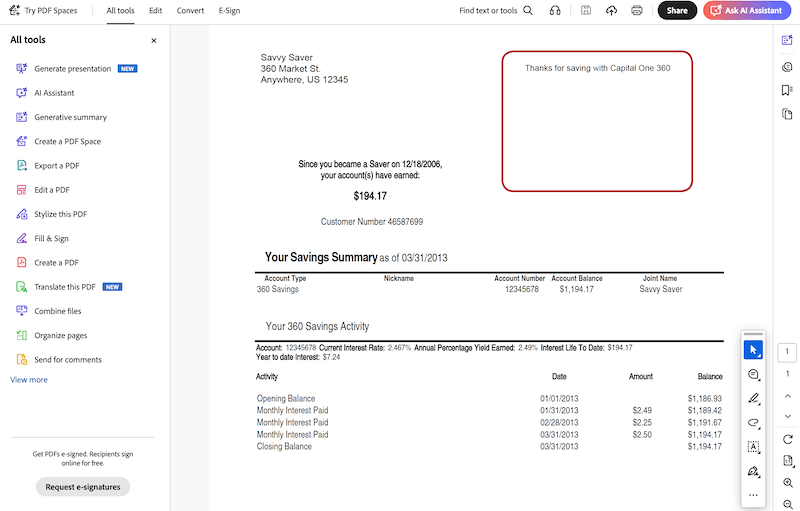
- Head to All tools >Redact a PDF >Redact text and images.
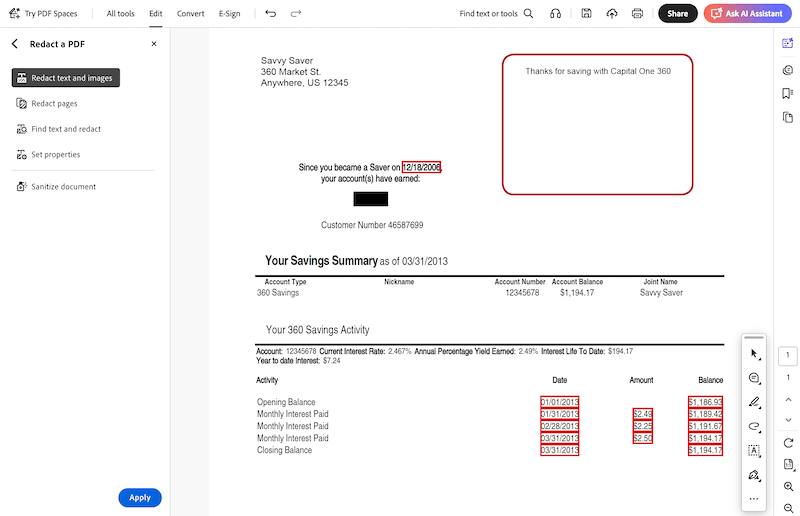
- Select the texts or images to redact in your bank statement. Then hit Apply.
- Click Continue to apply the redactions and Save your file.